AI calorie tracking for iPhone, without the subscription.

SnapNutrition AI turns a photo, a barcode, a voice note, or a typed line into calories and macros, and keeps the diary on your iPhone, iPad, and Apple Watch. Bring your own Gemini, OpenAI, Anthropic, or OpenRouter key and the app costs nothing. Or turn on Auto Mode for $2.99 a month and never touch a key.

  • No account
  • Diary stays on your device
  • 14 languages
  • iOS 17.6 or later
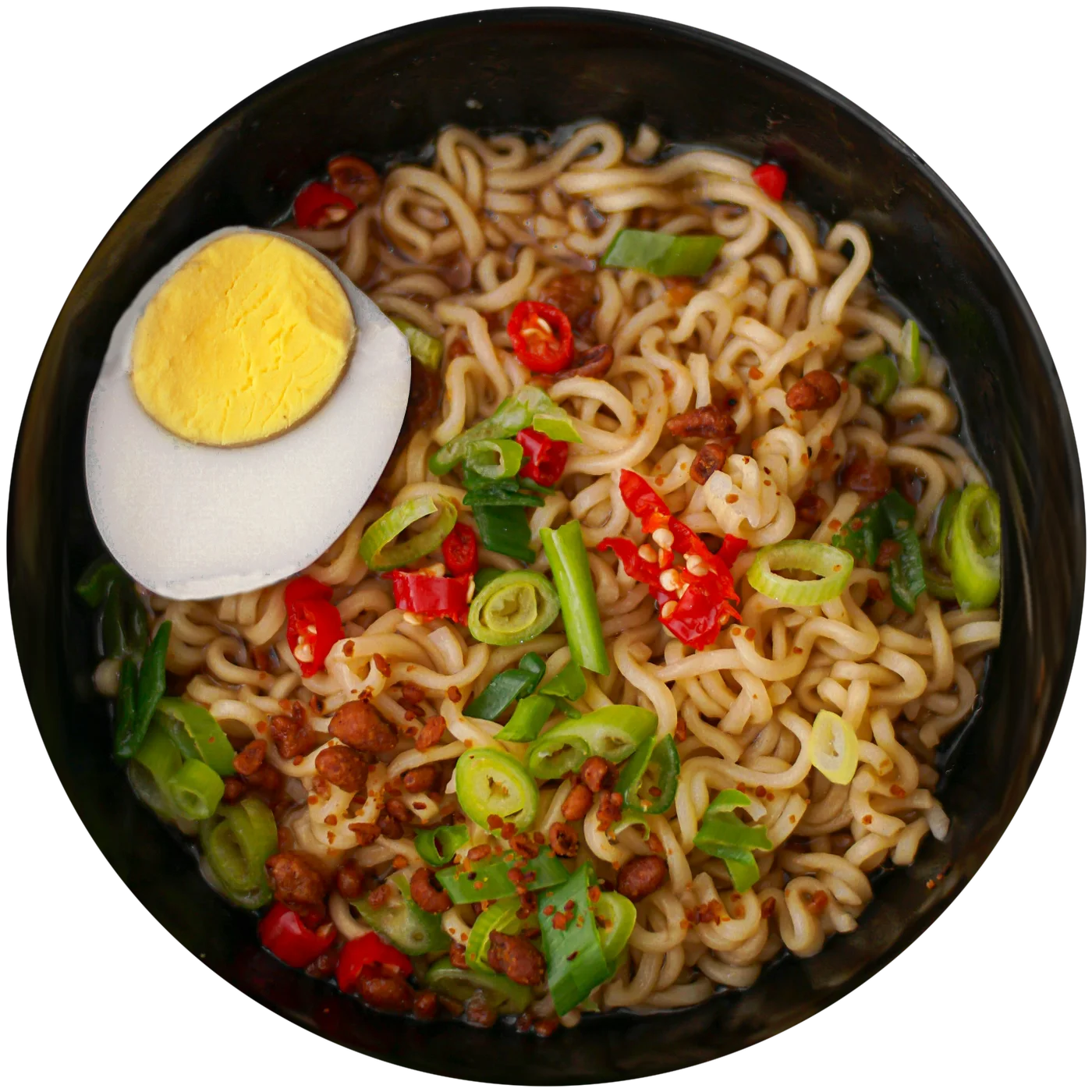
SnapNutrition AI meal screen: a bowl of ramen with egg, 357 kcal, 14 g protein, 52 g carbs, 11 g fat, and an editable list of components

One meal, one day, every day since

Every scan comes back as components you can correct. Meals group into days with a total, and the days build a chart with a goal line and a 7-day average.

Meal detail: ramen with egg, 357 kcal, with each component's weight and macros

A meal

Photo, barcode, voice, or text. The estimate arrives as a list of components; change a portion, remove an item, add one, then save.

Food diary: meals grouped by day with a calorie total for each day

A day

Meals grouped by day with the day's total. Favourites log again in one tap, manual entries can be backdated, and the whole diary exports as JSON or CSV.

Statistics: calorie and macro rings, a daily chart with the goal line, days within goal and the daily average

Every day since

Calorie and macro rings, a goal line on the chart, a 7-day average, and how many logged days landed within goal.

Log it the way the moment allows

Nine ways in, so the diary stays complete on the days a photo is not practical.

Photo
Point and shoot. The AI names the dish and breaks it into components.
Photo library
Log the lunch you photographed hours ago.
Barcode
Packaged food comes straight from the label data.
Voice
Say what you ate, on iPhone or from your wrist.
Text
Type a line when the camera would be awkward.
Manual entry
Enter known numbers yourself. No AI request, works offline, can be backdated.
Share sheet
Send a food photo in from Messages, Photos, or any other app.
Siri Shortcuts
Log a meal or ask what is left for the day without opening the app.
Widgets
Log with one tap from the Home Screen, Lock Screen, or Control Center, and see the day's calorie progress without opening the app.

What it costs

Your own AI key

$0to SnapNutrition, ever

Create a key at Google Gemini, OpenAI, Anthropic, or OpenRouter and paste it in once. Gemini and OpenRouter offer free tiers that cover normal daily logging, so scanning can cost nothing. Paid providers bill a few cents per scan, typically $1 to $3 a month for three meals a day.

  • Your key stays in the iOS Keychain
  • Requests go straight from your phone to the provider
  • Switch providers whenever you like

Auto Mode

$2.99a month, or $29.99 a year

No key to create. Scans pass through our proxy, which never stores your photos, and a fair-use daily limit applies. Three-day free trial, cancel any time in the App Store settings.

  • Nothing to configure
  • Same diary, same devices
  • Turn it off and keep everything you logged

Core tracking is never locked behind Auto Mode. Provider prices and free tiers are set by the providers and can change.

The app, screen by screen

The six iPhone screens, as they appear on the App Store. The same diary runs on iPad, and the Apple Watch app logs by voice and shows the day's rings on your wrist.

SnapNutrition AI home screen with scan, photo, barcode, voice, text, and manual entryCamera view pointed at a bowl of ramenFood diary with meals grouped by day and a daily calorie totalStatistics with calorie and macro rings, a goal line, and days within goalMeal detail: editable portions for every componentHome Screen widgets for calorie progress and one-tap logging

Compared with the apps people switch from

Free means different things. Checked against each app's own listing or FAQ in August and September 2026.

AppPhoto scans without payingWhen you outgrow free
SnapNutrition AIUnlimited with your own key. Only your provider's limits apply.$0, or Auto Mode at $2.99 a month
MyFitnessPalNone. Meal Scan is a Premium feature.$19.99 a month or $79.99 a yearFull comparison
Cal AINone without a subscription.About $29.99 a year; offers vary in-appFull comparison
SnapCalorieUp to 3 AI logs a day.Premium subscription; price not listed in its FAQFull comparison

Accuracy, stated plainly

Estimates from a photo land within 10 to 30 percent of the truth, depending on portion size, hidden oils, and mixed dishes. That is good enough for consistent logging and not good enough for laboratory measurement, which is why every component can be edited after a scan, and why a week's trend tells you more than any single day. The accuracy guide goes through the failure modes and how to get better results.

SnapNutrition AI at a glance

What it is
An AI calorie tracker and food diary for iPhone, iPad, and Apple Watch.
Made by
Unibrix. This is the official website.
Where to get it
The App Store, iOS 17.6 or later. There is no Android version.
Price
Free with your own Google Gemini, OpenAI, Anthropic, or OpenRouter key. Optional Auto Mode is $2.99 a month or $29.99 a year.
Account
None. Your diary stays on your device, with optional iCloud sync.
Your data
Stored on your device, synced through your own iCloud if you turn it on, and exportable as JSON or CSV at any time.
Ways to log
Photo, photo library, barcode, voice, text, manual entry, and the iOS share sheet.
Languages
14, including English, Spanish, German, French, Polish, and Ukrainian.
Similar names
SnapNutrition AI is not connected to other apps or websites that use a similar name.

Frequently asked questions

What does SnapNutrition AI cost?

The app has no mandatory subscription. In BYOK mode, Gemini and OpenRouter offer free tiers; paid providers bill you directly for AI usage. Optional Auto Mode costs $2.99/month or $29.99/year after a 3-day trial. Provider pricing and free-tier availability can change.

How does the AI food scanner work?

Simply take a photo of your food, and the AI analyzes the image to identify ingredients and estimate calories, protein, carbs, and fat. You can also scan barcodes, type a description, use voice input for hands-free tracking, share a photo in from another app, or enter a meal manually when you already know the numbers.

How accurate is AI calorie counting?

AI calorie estimates are typically within 10-30% accuracy depending on portion sizes and preparation methods. SnapNutrition AI displays this disclaimer and allows you to manually adjust portions and ingredients for better accuracy. Read more about what AI calorie counters can and can't do.

Is my data private?

Yes. Your meal data stays on your device, and syncs through your own iCloud only if you turn that on. In BYOK mode, food images go straight from your device to the provider you picked — Google, OpenAI, Anthropic, or OpenRouter — and we operate no backend at all. In optional Auto Mode, photos pass through our proxy on the way to the AI and are not stored. You can export your whole diary as JSON or CSV at any time. See our Privacy Policy for full details.

What API key do I need?

Any of four: Google Gemini, OpenAI, Anthropic (Claude), or OpenRouter. Gemini is the easiest starting point because it has a free tier — create a key at aistudio.google.com, paste it in, and you can scan without paying anyone. OpenRouter also has a free tier. The app marks which providers are free while you're choosing, so you don't have to research it first.

What is BYOK (Bring Your Own Key)?

BYOK stands for Bring Your Own Key. Rather than requiring a subscription, SnapNutrition AI lets you use your own API key from Google Gemini, OpenAI, Anthropic, or OpenRouter. You pay the AI provider directly for usage — typically $0.01-0.03 per food scan, or nothing at all on Gemini's or OpenRouter's free tier. This model makes the app free to use while giving you access to the latest AI models. (For users who'd rather skip the API-key setup, an optional Auto Mode subscription is also available.) Read our full guide to the BYOK calorie tracker model.

Can I use SnapNutrition AI on iPhone, iPad, and Apple Watch?

Yes, SnapNutrition AI is available on iPhone, iPad, and Apple Watch with iCloud sync across all your Apple devices. The Watch app lets you log calories by voice and view your daily progress right from your wrist. There is no Android version.

Is SnapNutrition AI on the App Store?

Yes. SnapNutrition AI is on the App Store for iPhone and iPad, with a companion Apple Watch app, and needs iOS 17.6 or later. It is made by Unibrix, and there is no Android version.

Is SnapNutrition AI the same as other apps called SnapNutrition?

No. Several unrelated apps and websites use a similar name, including an Android app. SnapNutrition AI is a separate app for Apple devices, made by Unibrix, and snapnutritionai.app is its only official website.

How does SnapNutrition AI compare to SnapCalorie?

Both estimate calories from food photos. SnapCalorie's FAQ says it is free for up to three AI logs per day, with a premium subscription beyond that, and it runs on a SnapCalorie account. SnapNutrition AI sets no scan cap of its own in BYOK mode, only your provider's limits apply, and it needs no account: the diary stays on your device. Read the full SnapCalorie comparison.
Guides and comparisons

Longer reads on cost, accuracy, and privacy, with sources.

Try it with your own key. There is nothing to cancel.

Free on the App Store for iPhone, iPad, and Apple Watch. Add a Gemini or OpenRouter key and the first scan costs nothing.

Download SnapNutrition AI on the App Store

SnapNutrition AI is for general food logging and wellness support. It is not medical advice and should not replace guidance from a doctor or registered dietitian.